The Support Message That Still Makes Me Wince
The support message that still makes me wince came from a subscriber who’d spent three evenings trying to get his streams working. He was technically confident, worked in IT, actually, but he’d been given the wrong player recommendation for his device setup, and every troubleshooting step he’d taken had made things progressively worse rather than better.
By the time he messaged me, he’d uninstalled and reinstalled four different IPTV player apps, factory reset his Fire TV stick twice, and was composing what he described as “a strongly worded message” to his previous provider. The streams themselves were fine. The panel was working perfectly. The problem was entirely that he’d been using an M3U player that couldn’t handle his connection type, when his setup needed an Xtream Codes client.
Twenty minutes after I pointed him to TiviMate and walked him through the configuration, everything worked flawlessly. He renewed for six months on the spot.
That experience, and dozens like it since, is why I consider player knowledge one of the most underrated skills in the IPTV UK reseller toolkit. Get player recommendations right and your support volume drops dramatically. Get them wrong and you’ll spend hours troubleshooting problems that have nothing to do with your panel or provider.
This guide IPTV Player Guide for UK Resellers covers why player choice matters more than most resellers realise, the three connection methods every reseller must understand, a breakdown of TiviMate, IPTV Smarters Pro, GSE Smart IPTV, Smart IPTV, STBEmu, and Perfect Player, device-by-device recommendations, common player problems and how to diagnose them, and what your player choice means for panel selection.
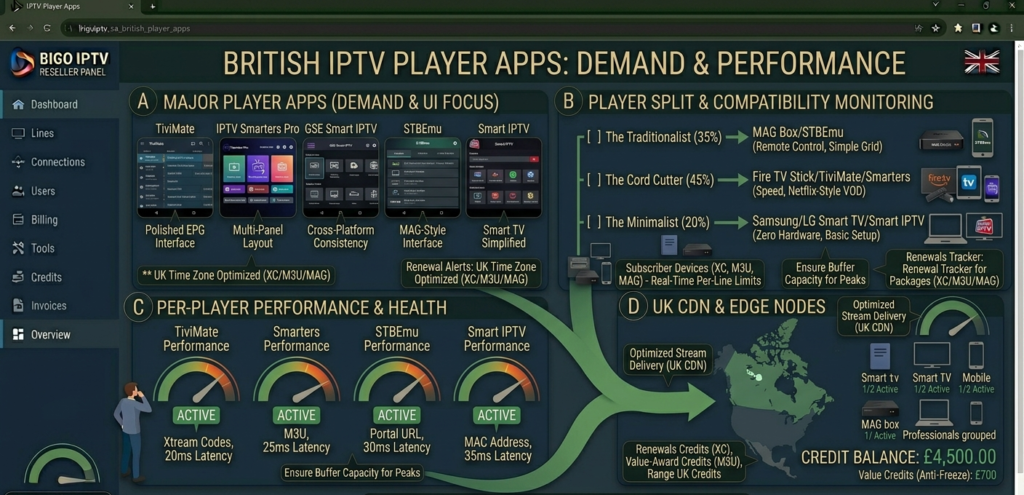
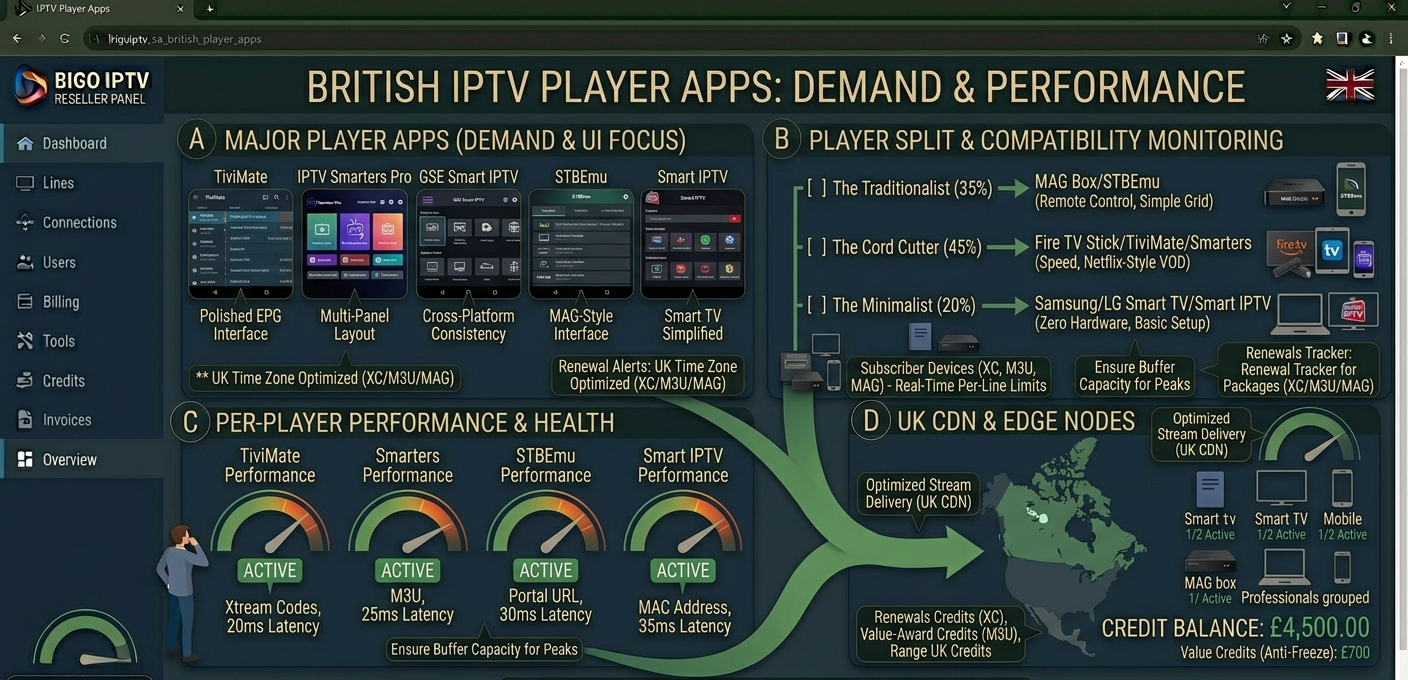
Comparison of major IPTV player apps for UK subscribers showing TiviMate, IPTV Smarters Pro, GSE Smart IPTV, STBEmu, and Smart IPTV interface screenshots with device compatibility indicators
Why Player Choice Matters More Than Most Resellers Realise
Most resellers treat player selection as an afterthought, something subscribers sort out themselves after getting their credentials. This is a significant missed opportunity that directly affects both subscriber experience and support overhead.
The IPTV player is the only part of the entire service chain that the subscriber interacts with directly. The upstream infrastructure, CDN architecture, anti-freeze systems, panel management, none of this is visible to the subscriber. What they see, touch, and experience is entirely mediated by the player application they’re using. An excellent panel delivering perfect streams through a poorly configured or wrong-category player produces a terrible subscriber experience. A mediocre stream delivered through a well-matched player with good buffering management often produces an acceptable experience.
Player choice also affects your support volume disproportionately. The most common category of IPTV support contact, after peak-demand stream quality issues, is player configuration problems. Subscribers who’ve been steered toward the right player for their device and connection type from the start generate a fraction of the setup support contacts of those who’ve been left to figure it out themselves.
In my experience, resellers who include specific player recommendations and basic setup guidance as part of their onboarding process reduce their first-month support contacts by 40 to 50% compared to those who simply issue credentials and move on. That’s a significant operational efficiency gain that compounds as your subscriber base grows.
Pro Tip: Create a device-specific onboarding guide for the three or four most common device types in your subscriber base, Fire TV stick, Android phone, Samsung smart TV, MAG box, with specific player recommendations and step-by-step setup instructions for each. Send the appropriate guide at onboarding rather than waiting for the subscriber to encounter problems. This investment of thirty minutes per guide saves hours of reactive support conversations.
The Three Connection Methods Every Reseller Must Understand
Before diving into specific player applications, you need to understand the three fundamental connection methods that IPTV players use, because this is the layer that determines which players are appropriate for which subscribers.
Xtream Codes (XC) is the most widely used connection protocol in the modern IPTV ecosystem. It uses three pieces of information: a server URL, a username, and a password. The player connects to the panel server, authenticates with the credentials, and retrieves the channel list, EPG data, and VOD catalogue dynamically. Xtream Codes connections support EPG, VOD, and catch-up functionality natively, and they’re the connection method your panel’s management system tracks for concurrent connection monitoring and line status.
M3U playlist is an older connection method that uses a single URL pointing to a playlist file. The player downloads the playlist, which contains a list of stream URLs and channel metadata, and plays streams directly from those URLs. M3U connections are simpler to set up but offer less dynamic functionality than Xtream Codes. EPG support requires a separate EPG URL, VOD organisation is less sophisticated, and the panel has less visibility into M3U connections for management purposes.
Portal/MAC address is the connection method used by MAG boxes and STBEmu. The device presents its MAC address to a portal URL, the panel authenticates the MAC, and the device receives its channel list through the portal interface. This method offers a traditional set-top box experience with familiar navigation but limits flexibility compared to app-based players.
Understanding which connection method each player supports, and which is optimal for each subscriber’s use case, is the foundation of making good player recommendations.
TiviMate: The Gold Standard for Serious UK Subscribers
TiviMate is, without question, the premium IPTV player experience for Android-based devices in 2026. If a subscriber is using a Fire TV stick, an Android TV box, or an Android phone and wants the best possible viewing experience, TiviMate is the recommendation I make without hesitation.
The interface is polished to a level that makes other players feel like beta software by comparison. The EPG implementation is the best in the category, multi-day guide display, catch-up support where the panel provides it, series recording functionality, and customisable layout options that let technically engaged subscribers configure exactly the viewing experience they want.
The Xtream Codes integration is seamless and feature-complete. Multiple playlist support allows subscribers to organise their channel list exactly how they want. Favourite channels, custom categories, and hide-unwanted-channels functionality make navigating a large channel list genuinely comfortable rather than an exercise in scrolling through hundreds of unlabelled entries.
For UK subscribers primarily watching live sport, TiviMate’s EPG during Premier League fixtures is particularly good, accurate programme information, correctly handled UK time zone data, and smooth switching between live streams without the buffer delay that plagues some competitor players.
The one significant caveat: TiviMate requires a paid companion app licence, approximately £3.99 one-time, to unlock its full functionality. The free version is functional but limited. For subscribers asking whether it’s worth paying, the answer is unequivocally yes. For resellers, it’s worth noting this cost in onboarding communications so subscribers aren’t surprised.
Device compatibility: Android TV (Fire TV, Nvidia Shield, Android TV boxes), Android phones and tablets. Not available on iOS or Samsung/LG smart TVs.
IPTV Smarters Pro: The Versatile All-Rounder
IPTV Smarters Pro occupies a different market position to TiviMate, it’s the free, cross-platform option that supports both Xtream Codes and M3U connections and runs on a wider range of devices including iOS.
For subscribers who want a functional, capable IPTV player without paying for a premium app, Smarters Pro is a solid choice. The interface isn’t as refined as TiviMate, the category organisation is less intuitive and the EPG display is more basic, but the core functionality works reliably and it covers a wider device range.
The iOS availability is Smarters Pro’s most significant differentiator from TiviMate. For iPhone and iPad subscribers, Smarters Pro is the Xtream Codes client that I recommend as a first option. The iOS version is functionally equivalent to the Android version, which means it’s capable without being exceptional, but it’s the best mainstream option for Apple device users.
Multi-screen support, the ability to watch one channel while browsing the programme guide for another, is present in Smarters Pro but less polished than TiviMate’s implementation. For subscribers who use this feature regularly, the TiviMate experience is noticeably superior.
Device compatibility: Android, iOS (iPhone/iPad), Amazon Fire TV, some smart TV platforms. Available on both Google Play and Apple App Store.
Pro Tip: When a subscriber contacts you about buffering issues, one of the first questions to ask is which player they’re using. TiviMate and IPTV Smarters Pro handle stream buffering differently, TiviMate’s buffer management is generally more aggressive and effective. If a subscriber is experiencing buffering on Smarters Pro that isn’t present on other devices, switching to TiviMate on the same device and connection often resolves it without any panel or stream change. Player-side buffer management is a real variable that many resellers overlook entirely.
GSE Smart IPTV: The Cross-Platform Option
GSE Smart IPTV is the player I recommend to subscribers who need cross-platform consistency, specifically those who watch across multiple devices and want a familiar interface everywhere.
The application is available on Android, iOS, Apple TV, and Amazon Fire TV, making it one of the widest-compatibility players in the category. The interface design is consistent across platforms, which means a subscriber who learns GSE on their iPhone can immediately navigate the Apple TV version without relearning the layout.
M3U and Xtream Codes are both supported natively, and the M3U implementation in GSE is particularly strong, making it the go-to recommendation for subscribers who specifically need or prefer M3U connections rather than Xtream Codes.
The EPG implementation is functional rather than exceptional. It handles standard EPG data correctly and displays it in a usable guide format, but it doesn’t match the depth and polish of TiviMate’s EPG experience. For subscribers who rely heavily on the programme guide for navigation, particularly during live sport planning, TiviMate remains the superior choice where device compatibility allows.
Device compatibility: Android, iOS, Apple TV (tvOS), Amazon Fire TV. One of the few players with genuine Apple TV support, making it the default recommendation for Apple TV subscribers.
Smart IPTV: The Smart TV Solution
Smart IPTV, the Samsung and LG smart TV application, occupies a distinct category from the other players in this guide because it operates through a MAC address registration system rather than credential-based login.
The application is installed directly through the Samsung Tizen or LG WebOS app store and provides a television-native IPTV viewing experience without requiring any additional hardware. For subscribers who specifically want to use their smart TV without external devices, Smart IPTV is the primary option.
The interface is functional rather than elegant, it delivers channel list navigation, EPG display, and VOD access in a format that works comfortably with a TV remote control. It won’t impress subscribers who’ve used TiviMate, but it serves its core purpose well and provides a familiar experience for less technically confident subscribers who are comfortable with their television’s native interface.
The MAC address registration workflow creates specific IPTV UK reseller management requirements covered in detail in the Smart IPTV guide on this site. The key operational point: each device requires individual MAC registration, TV replacements generate a re-registration support contact, and app updates occasionally reset settings requiring playlist re-entry.
Device compatibility: Samsung smart TVs (Tizen OS), LG smart TVs (WebOS). Not available on other smart TV platforms.
STBEmu: The MAG Emulator That Punches Above Its Weight
STBEmu is an Android application that emulates MAG set-top box behaviour, allowing subscribers to use the portal-based connection method on Android devices without purchasing physical MAG hardware.
For subscribers who prefer the MAG-style interface, channel list navigation, programme guide display, and content organisation familiar from set-top box usage, but are using Android devices, STBEmu provides that experience without the hardware cost. It’s particularly popular among subscribers transitioning from MAG boxes to Fire TV sticks or Android TV boxes who want to maintain their familiar navigation experience.
The portal connection method means setup requires entering a portal URL rather than Xtream Codes credentials, which is a different workflow to credential-based players but one that most MAG-accustomed subscribers are comfortable with.
From a reseller management perspective, STBEmu connections appear in your panel similarly to MAG portal connections. The concurrent connection monitoring and line management works through the same portal infrastructure as physical MAG devices.
Device compatibility: Android devices (phones, tablets, Android TV boxes, Fire TV sticks). Not available on iOS.
Measuring successful first setup rate, subscriber satisfaction rate, and support contact rate per player across your subscriber base over three months gives you the data to make genuinely evidence-based player recommendations rather than preference-based ones. In my experience, TiviMate consistently scores highest on all three for Android device subscribers.
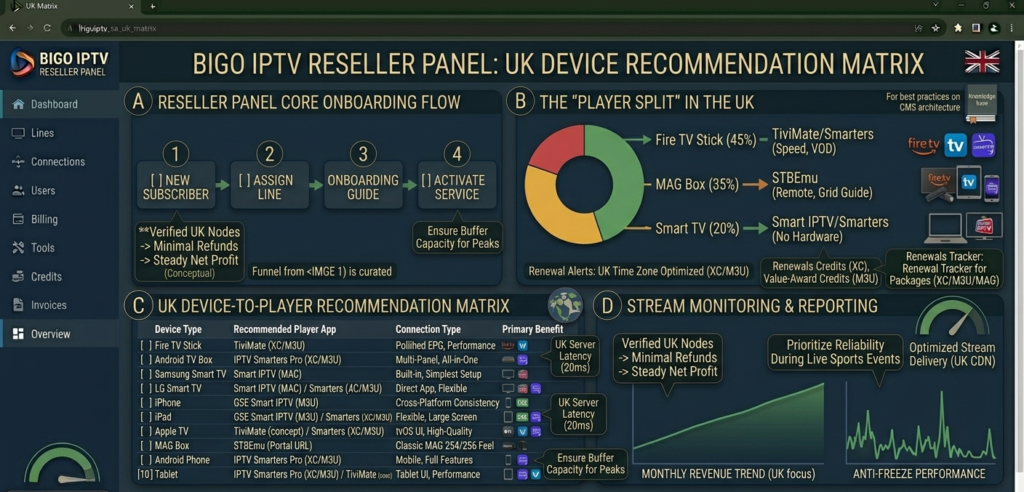
Device-to-player recommendation matrix for UK IPTV resellers showing optimal player app for Fire TV stick, Android TV box, iPhone, iPad, Apple TV, Samsung smart TV, LG smart TV, MAG box, Android phone, and tablet
Device-by-Device Player Recommendations
Here’s the quick-reference guide I use for player recommendations across the device types I encounter most commonly in UK subscriber bases:
| Device | Primary recommendation | Alternative |
|---|---|---|
| Amazon Fire TV Stick | TiviMate | IPTV Smarters Pro |
| Android TV Box | TiviMate | IPTV Smarters Pro |
| Android Phone/Tablet | TiviMate | GSE Smart IPTV |
| iPhone/iPad | IPTV Smarters Pro | GSE Smart IPTV |
| Apple TV | GSE Smart IPTV | — |
| Samsung Smart TV | Smart IPTV | — |
| LG Smart TV | Smart IPTV | — |
| MAG Box | Native MAG portal | — |
| Android device (MAG preference) | STBEmu | — |
| PC/Laptop (Windows) | IPTV Smarters Pro (web) | VLC with M3U |
This matrix covers approximately 95% of the device scenarios you’ll encounter in a typical UK subscriber base. Having it available during onboarding and support conversations means you’re never guessing.
Common Player Problems and How to Diagnose Them
“Streams load but buffer constantly” — First, establish whether the buffering is device-specific or affects all devices. If it’s device-specific, try switching players on the same device. TiviMate’s buffer management typically outperforms other players on the same connection. If all devices buffer simultaneously, the issue is panel-side or upstream.
“EPG shows wrong times” — Almost always a BST/UTC time zone issue. The player’s time zone settings should be set to UTC+1 during British Summer Time. Some players detect this automatically; others require manual configuration. Check the player’s EPG time offset settings before escalating to your provider.
“Some channels play but others show error” — This is typically a channel-specific stream issue rather than a player problem. Test the same channels on a different device with a different player to confirm. If the issue follows the channel rather than the player, it’s upstream. If it follows the player, it’s a connection or configuration issue.
“Player works for a few minutes then stops” — Usually indicates a concurrent connection limit being hit. Check whether the subscriber is running streams on other devices simultaneously. Connection limit conflicts present identically to stream failures from the subscriber’s perspective.
“VOD works but live TV doesn’t (or vice versa)” — This is an Xtream Codes connection-specific diagnostic. If VOD streams but live channels fail, the live stream URLs may have changed and the playlist needs refreshing. In TiviMate, force-refresh the playlist. In Smarters Pro, update the subscription data.
Pro Tip: Create a simple diagnostic checklist as a saved message for your most common player-related support scenarios. Something like: “Quick check, which app are you using? What device? Does the same channel work on any other device? Have you tried force-closing the app and reopening? Has this just started or has it never worked?” These four questions resolve approximately 60% of player-related support contacts without any further involvement. The ones that remain after these checks are genuinely complex and worth investigating properly.
What Your Player Choice Means for Panel Selection
This section connects player knowledge back to the broader infrastructure conversation, because the two are more closely related than most resellers appreciate.
Not all panels deliver equal performance across all player types. Xtream Codes implementation quality varies between panel providers, some panels have robust XC APIs that work cleanly with TiviMate and Smarters Pro, others have implementation quirks that cause specific players to behave unexpectedly. EPG data delivery, particularly timing accuracy and multi-day scheduling population, depends on both the panel’s EPG system and how well each player retrieves and displays that data.
MAG portal stability, critical for MAG boxes and STBEmu, is a separate system from the Xtream Codes API and can perform differently even on the same panel. A panel with excellent XC performance and unreliable portal delivery will produce inconsistent subscriber experiences depending on device type.
When testing a panel during evaluation, test it across all three connection methods, Xtream Codes via TiviMate, M3U via GSE, and portal via STBEmu, not just through a single player on a single device. A panel that performs excellently through one connection method and poorly through another tells you something important about which subscriber device types it will serve reliably and which it will disappoint.
For UK resellers who want a panel that performs consistently across all major player applications and connection types, with UK-optimised CDN delivery that works cleanly with TiviMate’s buffer management, reliable portal infrastructure for MAG and STBEmu connections, and EPG data that displays correctly in every major player, britishseller.co.uk is the starting point I recommend to resellers who’ve learned from experience that player-panel compatibility matters as much as headline stream quality claims.
IPTV Player UK Reseller Success Checklist
Build a device-to-player recommendation matrix before your first subscriber onboarding, use the reference table in this guide as your starting point and customise it based on the device types most common in your target subscriber demographic. Having this ready means every onboarding includes the right player recommendation rather than leaving subscribers to figure it out themselves.
Test your panel across all three connection methods, Xtream Codes, M3U, and portal, before committing to it, inconsistent performance between connection methods reveals infrastructure weaknesses that single-method testing misses entirely. Use TiviMate for XC testing, GSE for M3U testing, and STBEmu for portal testing to get a complete picture.
Include player setup guidance in your onboarding process as standard, specific step-by-step instructions for the player you’re recommending, sent at the point of first line creation rather than in response to a support contact. This single process change reduces first-month support volume by 40 to 50% in most UK IPTV reseller operations.
Learn to distinguish player problems from panel problems in your support diagnostics, the diagnostic questions in this guide, device type, player app, whether the issue is device-specific, whether it affects all channels or specific ones, should be your standard first response to every stream quality complaint. Accurate diagnosis produces faster resolution and prevents unnecessary provider escalations.
Check EPG time zone settings during every new subscriber setup, BST handling in IPTV players is inconsistent across applications and often requires manual configuration. A subscriber whose EPG shows times an hour out during summer months will contact you with “EPG is wrong” complaints that are entirely preventable with a thirty-second settings check during onboarding.