Half Past Two on a Saturday Afternoon
The call came in at half past two on a Saturday afternoon, precisely the worst possible moment. A reseller I’d been mentoring had just migrated 70 subscribers to a new panel, and none of their Xtream IPTV connections were authenticating. Streams were timing out. Subscribers were messaging. The football was twenty minutes from kickoff.
The problem, as it turned out, was something deceptively simple: the new panel’s Xtream Codes API was running on a non-standard port that his subscribers’ apps weren’t configured to recognise. The streams were fine. The credentials were correct. The server URL format was the issue, a single missing port number that was breaking authentication for every single Xtream Codes connection across his entire subscriber base.
Once we identified it, the fix took four minutes. Getting to that diagnosis, without understanding how Xtream IPTV connections actually work under the hood, would have taken considerably longer. Three of his subscribers had already given up and gone elsewhere by the time we resolved it.
That afternoon is why I believe understanding Xtream IPTV, not just using it, but genuinely understanding how it works, is one of the most practically valuable things a UK reseller can invest time in. It’s the connection protocol that underpins the majority of serious IPTV reseller operations in 2026, and the resellers who understand it properly run more efficient businesses, resolve subscriber issues faster, and make better infrastructure decisions than those who treat it as a black box.
This guide covers what Xtream IPTV actually is and why it dominates the market, how authentication works, the three content types it delivers, an honest comparison against M3U and portal connections, setup across major apps, server URL structure and common errors, panel management implications, EPG integration, UK-specific performance requirements, a systematic diagnosis framework, and what good infrastructure actually looks like.
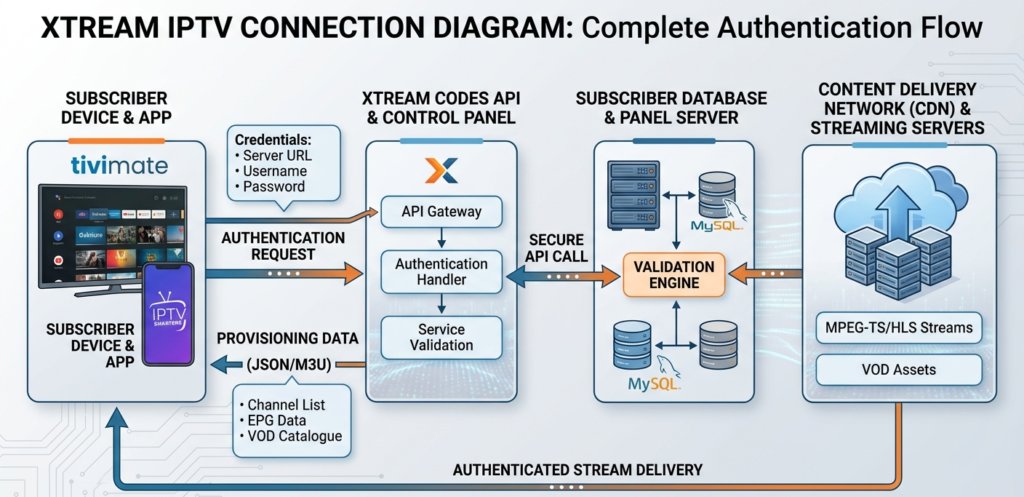
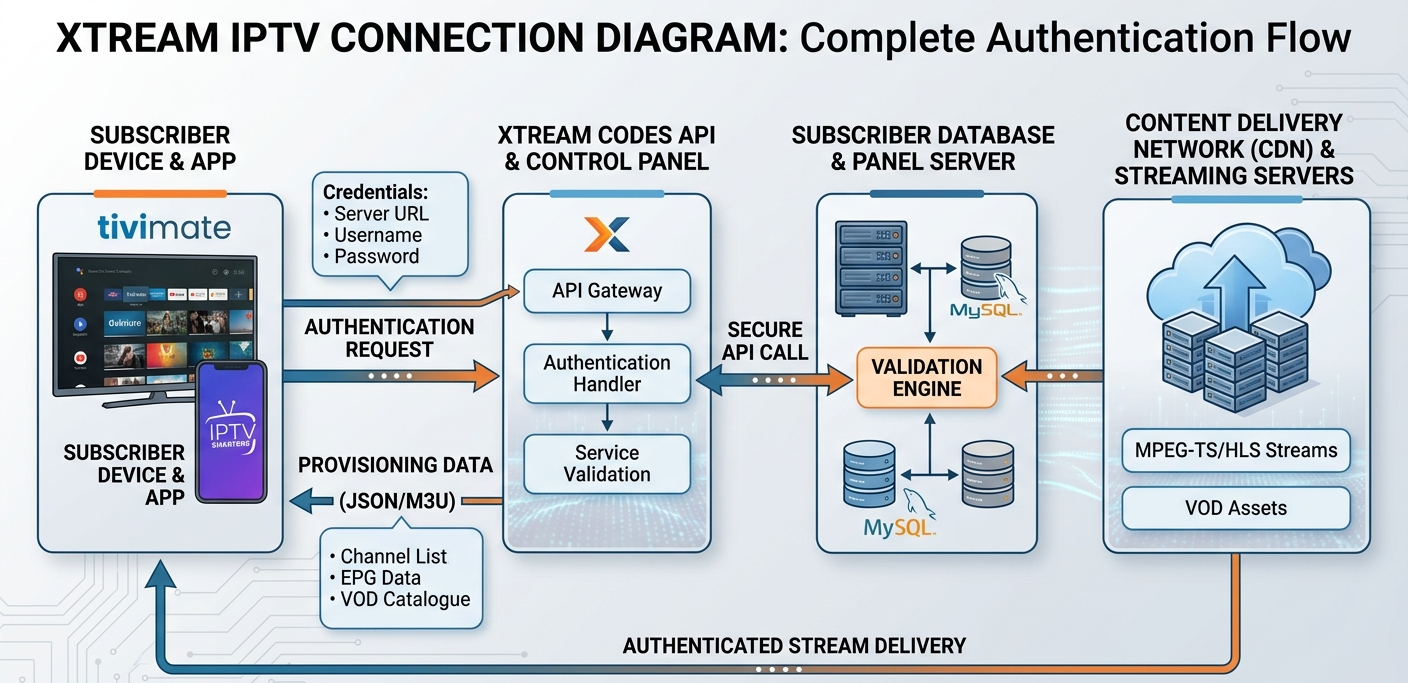
Xtream IPTV connection diagram showing the authentication flow from subscriber app through Xtream Codes API to panel server and CDN stream delivery, UK reseller technical guide
What Xtream IPTV Actually Is, And Why It Dominates the Market
Xtream IPTV, more precisely, the Xtream Codes API, is the connection protocol and panel management framework that has become the industry standard for IPTV reseller operations worldwide. If you’re running a reseller business in the UK in 2026 and you’re not operating on Xtream Codes infrastructure, you’re operating on something that’s either a proprietary alternative or a legacy system, and either of those positions carries meaningful risk.
The reason Xtream Codes achieved market dominance is straightforward: it solved the fragmentation problem that was holding the IPTV reseller industry back in its earlier years. Before a standardised API, every panel provider had proprietary connection formats that only worked with specific apps, on specific devices, configured in specific ways. Subscriber onboarding was complicated, app compatibility was limited, and resellers were locked into whatever ecosystem their panel provider had built.
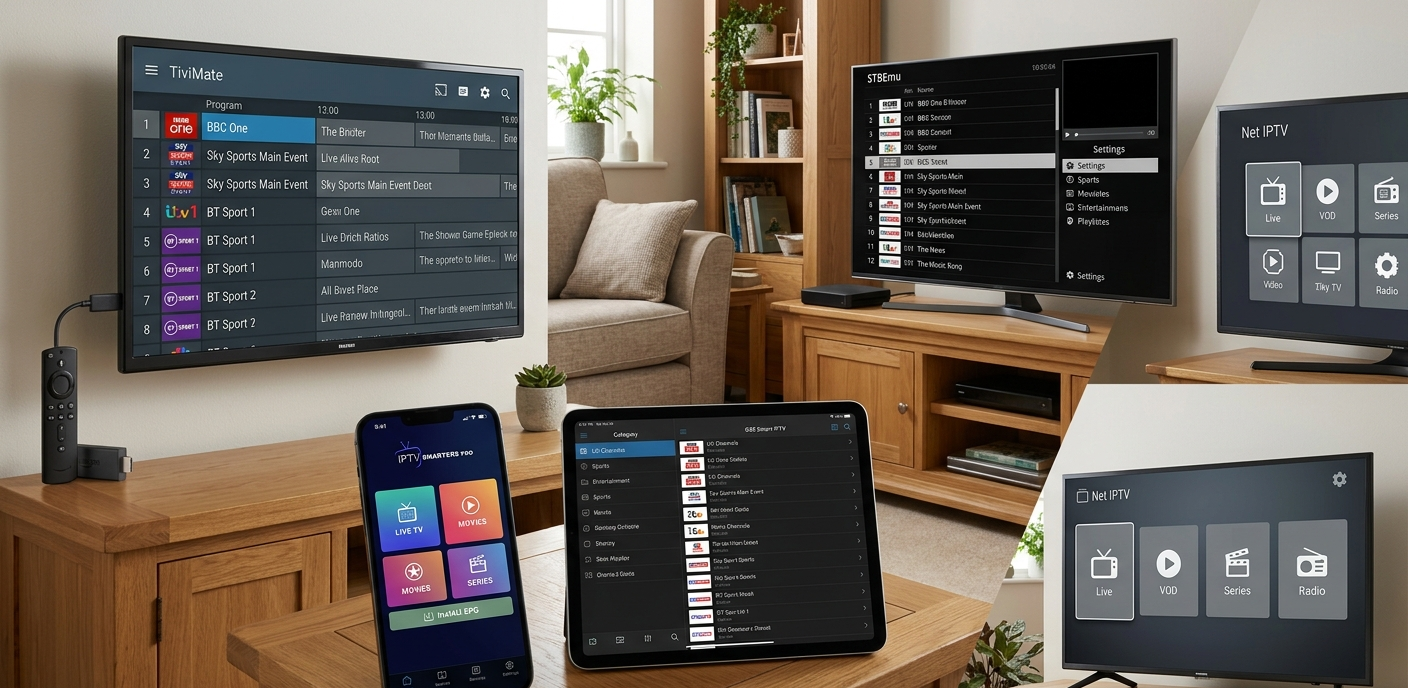
Xtream Codes standardised the connection layer. A server URL, a username, and a password, three pieces of information that work identically across TiviMate, IPTV Smarters Pro, GSE Smart IPTV, Perfect Player, and every other major Xtream Codes compatible app. The subscriber doesn’t need to know which panel you’re using. The app doesn’t need panel-specific integration. The API handles authentication and content delivery in a standardised way that the entire ecosystem has built around.
For UK resellers, this standardisation has a concrete operational benefit: you can recommend TiviMate as your standard app recommendation knowing that it will work cleanly with your Xtream Codes panel, regardless of which specific panel provider you’re using. And when you need to migrate subscribers from one panel to another, which happens when providers fail, improve, or raise prices beyond acceptable levels, the migration is straightforward: new server URL, same username and password structure, same app setup.
Pro Tip: Always verify that a new panel’s Xtream Codes API uses standard port 80 or 443 before migrating or onboarding subscribers. Non-standard ports, while technically valid, require explicit port specification in the server URL and create additional configuration friction for subscribers. Ask your panel provider specifically: “Does your Xtream Codes API run on standard ports?” A provider who can’t answer this clearly either doesn’t understand their own infrastructure or doesn’t have documentation, neither is reassuring.
How Xtream Codes Authentication Works
Understanding the authentication mechanism is what allows you to diagnose connection failures accurately rather than guessing. Here’s what actually happens when a subscriber connects via Xtream IPTV.
When a subscriber enters their credentials into TiviMate or IPTV Smarters Pro, the app constructs an authentication request to the panel server. This request hits the panel’s Xtream Codes API endpoint, typically formatted as (http://serverurl:port/get.php?username=X&password=Y&type=m3u) plus or variations thereof, and the API responds with either an authentication success and the subscriber’s content entitlement, or an authentication failure.
On successful authentication, the API returns a playlist response containing the subscriber’s entitled content. This includes the live channel list with stream URLs, EPG data source reference, and VOD catalogue entries. The app processes this response and populates the subscriber’s channel list, programme guide, and VOD library accordingly.
This authentication happens every time the app is opened and periodically during active use to verify the line is still active. This is why a subscriber whose line has been suspended or expired in your panel will lose access even mid-viewing session, the periodic re-authentication fails and the stream drops.
The practical implications for resellers are significant. Line status changes take effect in near-real-time. When you suspend a line in your panel dashboard, the next authentication check by the subscriber’s app will fail and the stream will drop. This is useful for enforcement but means you need to communicate with subscribers before suspending rather than expecting them to get a warning.
Connection limit enforcement works through authentication too. When a line has reached its maximum concurrent connection count, additional authentication attempts from new devices return an authentication failure, which appears to the subscriber as a stream error rather than an explicit “connection limit reached” message. Knowing this helps you interpret “I can’t connect” complaints that aren’t actually stream quality issues.
Credential errors are the most common Xtream connection failure. A single character error in server URL, username, or password produces identical authentication failure to a suspended line or a server outage, from the subscriber’s perspective, it all looks like “the streams aren’t working.” Always verify credentials exactly as issued before investigating any other cause.
The Three Content Types Xtream IPTV Delivers
One of Xtream Codes’ key advantages over M3U-only connections is the native support for three distinct content types through a single authenticated connection.
Live TV streams are the primary content type, real-time streaming of live television channels. These are the streams that your subscribers primarily pay for, with live sport at the peak of demand. Xtream Codes live TV URLs are dynamically generated at the point of access, with authentication baked into the stream URL format, which means stream links don’t expire or need updating in the way that static M3U playlist URLs can.
Video on Demand (VOD) is delivered through the same Xtream Codes connection as live TV, with a separate catalogue section in the API response. VOD content in a properly maintained Xtream panel includes metadata, title, description, genre, thumbnail, alongside the stream URL. The quality of VOD delivery through Xtream Codes is significantly better organised than VOD through M3U playlists, where metadata is often limited or missing entirely.
Series content, episodic television organised by show, season, and episode, is a third content type that Xtream Codes handles natively with proper hierarchical organisation. Apps like TiviMate display Xtream series content in a structured format where subscribers can browse by show and select episodes in sequence, rather than scrolling through an undifferentiated list of episode files.
The ability to deliver all three content types through a single authenticated connection, with consistent metadata, organised navigation, and clean app integration, is one of the primary reasons Xtream Codes has become the standard and why M3U-only setups feel comparatively primitive once subscribers have experienced a well-configured Xtream connection.
A single Xtream Codes connection delivering thousands of live channels, tens of thousands of VOD titles, and comprehensive series catalogues through one set of credentials represents a content delivery architecture that would require multiple separate M3U playlists, each with their own management overhead, to replicate.
Xtream Codes vs. M3U vs. Portal: Honest Comparison
Each connection method has legitimate use cases, and a complete UK reseller operation will encounter all three. Here’s an honest assessment of where each fits, laid out in the table below:
| Dimension | Xtream Codes | M3U Playlist | Portal (MAG) |
|---|---|---|---|
| Content types supported | Live, VOD, Series | Live, VOD (limited) | Live, VOD (basic) |
| EPG integration | Native, seamless | Separate URL required | Built-in (limited) |
| App compatibility | All major apps | All major apps | MAG, STBEmu only |
| Panel management visibility | Full | Limited | Full (MAC-based) |
| Connection limit enforcement | Yes | No | Yes |
| Metadata quality | Excellent | Variable | Good |
| Setup complexity | Low | Very low | Low |
| Migration ease | Easy | Easy | Requires MAC update |
| Concurrent connection monitoring | Yes | No | Yes |
The table makes clear why Xtream Codes is the preferred connection method for the majority of subscriber scenarios. The loss of concurrent connection monitoring with M3U is a significant practical disadvantage for resellers, it means you can’t enforce connection limits or detect account sharing on M3U lines.
That said, M3U has legitimate uses: subscribers on devices or apps that don’t support Xtream Codes natively (increasingly rare in 2026), subscribers who specifically need playlist-format compatibility for their setup, and certain smart TV configurations where M3U is the simplest integration path.
Portal connections remain essential for MAG box subscribers and STBEmu users, there’s no Xtream Codes alternative for these device types.
Pro Tip: When a subscriber contacts you about setting up their connection, ask which app they’re using before recommending a connection method. TiviMate and IPTV Smarters Pro users should always be configured with Xtream Codes, it delivers better EPG, better VOD organisation, and gives you proper management visibility. The only time to recommend M3U is when the subscriber’s specific app or device doesn’t support Xtream Codes, which in 2026 is genuinely uncommon for mainstream apps.
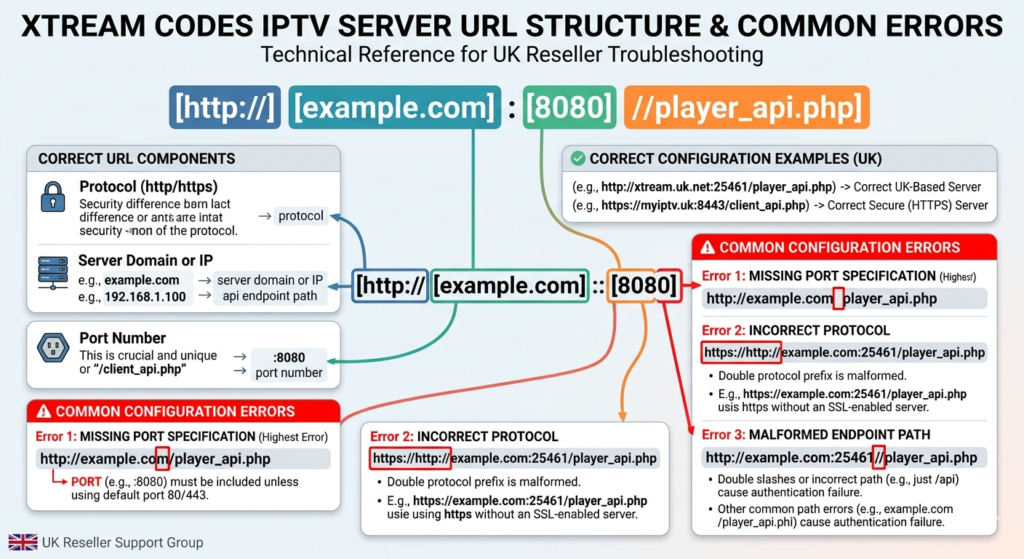
Xtream IPTV server URL structure diagram showing correct format with server address, port number, and API endpoint, with common configuration errors highlighted for UK reseller subscriber troubleshooting
Setting Up Xtream IPTV Connections on Major Apps
The setup process varies slightly between apps, but the core information required is always the same: server URL (including port if non-standard), username, and password. Here’s the specific setup path for the three apps you’ll most commonly be supporting.
On TiviMate for Fire TV / Android TV, open TiviMate → Add Playlist → Xtream Codes → enter server URL in the “URL” field (format: http://serveraddress:port) → enter username → enter password → Add → EPG and channel list populate automatically. If EPG doesn’t populate, check that the server URL is correct and that the panel’s EPG feed is active.
On IPTV Smarters Pro for Android/iOS, open Smarters Pro → Add User → Xtream Codes API → enter name (any label for the connection) → enter username → enter password → enter URL (server address only, without /get.php, the app appends the endpoint automatically) → Add User. VOD and series populate in their respective sections automatically on successful connection.
On GSE Smart IPTV for iOS/Apple TV, open GSE → Remote Playlists → Add → Xtream Codes → enter connection details. GSE’s Xtream Codes implementation requires the full server URL including port, verify this is entered correctly if the connection fails on first attempt.
The most common setup error across all apps is including or excluding the trailing slash or endpoint path in the server URL field. Different apps handle the URL formatting differently, some append the API endpoint automatically (Smarters Pro), others require the full URL (some versions of GSE). If a connection fails with correct credentials, try the URL with and without a trailing slash and with and without the port number explicitly specified.
Server URL Structure and Common Configuration Errors
Understanding server URL structure in detail is one of the most practically useful pieces of Xtream IPTV knowledge for a reseller who wants to diagnose connection problems quickly.
A standard Xtream Codes server URL follows this format: http://panelserver.domain:8080
Breaking this down: http:// is the protocol (some panels use https:// for encrypted connections), panelserver.domain is the server domain name or IP address, and :8080 is the port number (80 and 8080 are most common; standard HTTP port 80 often omitted; 443 for HTTPS).
Common errors that produce authentication failures include a missing port number. If a panel runs on a non-standard port (anything other than 80 or 443) and the subscriber’s app doesn’t include the port in the URL, authentication will fail. The fix is adding :PORT to the server URL.
An http vs. https mismatch is another common issue. Some panels require HTTPS connections and reject HTTP. If a connection fails with HTTP, try the same URL with https:// instead.
A trailing slash can cause trouble too. Some apps add a trailing slash to the URL automatically; others don’t. A URL mismatch caused by a trailing slash produces authentication failures that are indistinguishable from credential errors.
Domain vs. IP is worth checking as well. Most panels work with both their domain name and direct IP address. If domain name authentication fails, trying the direct IP sometimes reveals DNS resolution issues, particularly useful for diagnosing whether a connection problem is server-side or DNS-related.
And an outdated server address can be the culprit. Panel providers occasionally change server addresses, particularly after infrastructure updates or domain changes. If a previously working connection suddenly fails without credential changes, check with your provider whether the server address has changed.
How Xtream IPTV Affects Your Panel Management
The Xtream Codes infrastructure in your panel directly shapes how you manage your subscriber base, and understanding this connection makes you a better operator.
Line creation and credit consumption work in a specific way, each line you create in your panel is assigned an Xtream Codes username and password. Credit is consumed when the line is created (or when it’s first activated, depending on your panel’s credit accounting model). Suspended lines in most panels continue to consume the credit allocation until the line period expires, rather than pausing the credit clock, confirm your panel’s specific behaviour for this.
Concurrent connection monitoring is another key feature, your panel dashboard shows active connections per line in real-time through the Xtream Codes API. This is your account-sharing detection mechanism. A subscriber whose line consistently shows three or four concurrent connections when your policy allows two is exploiting a shared setup, and you can see this directly in your panel because Xtream Codes tracks it.
Line expiry and renewal matters too, when a line reaches its expiry date, Xtream Codes authentication for that username/password combination returns an authentication failure. Subscribers experience this as streams stopping, which generates urgent support contacts. The automated renewal alert sequence is essential precisely because the subscriber experience of an expired line is identical to a service outage from their perspective.
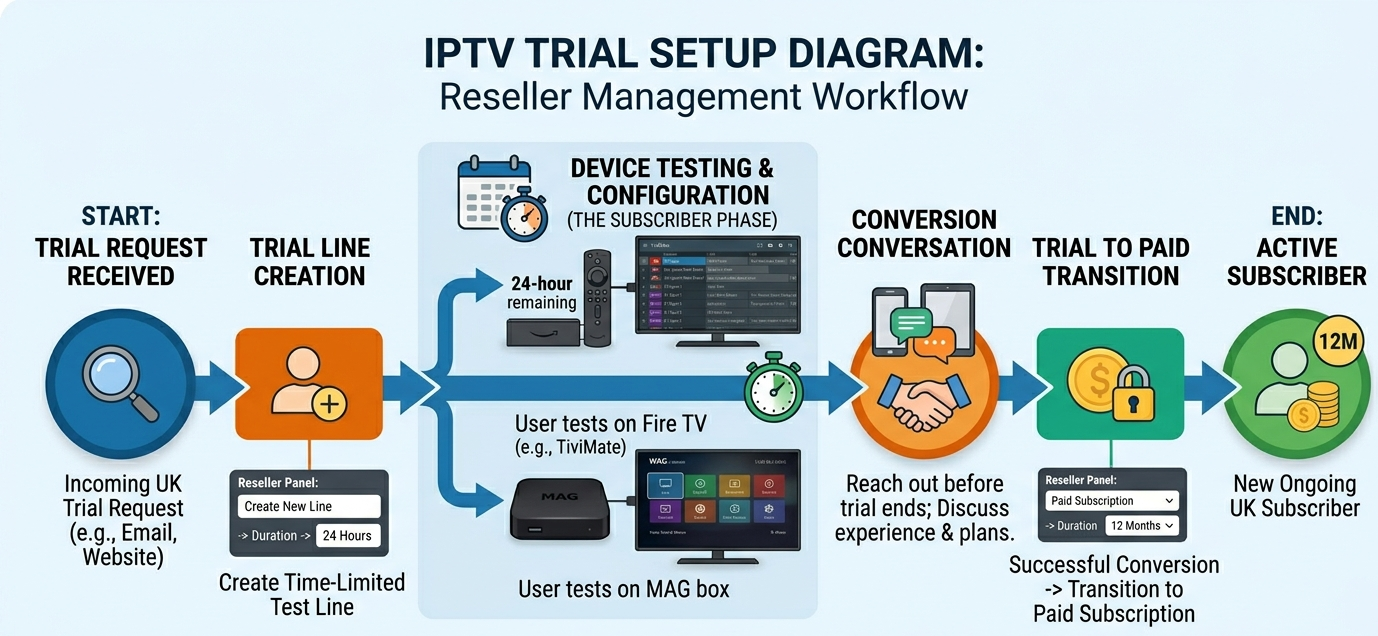
Trial line management follows the same pattern, trial lines in Xtream Codes panels are typically configured with short expiry periods (12 to 48 hours) and often single-connection limits. They authenticate identically to paid lines, the subscriber experience is the same. The difference is the expiry configuration in your panel dashboard.
EPG Integration Through Xtream Codes
EPG, Electronic Programme Guide, data is delivered through the Xtream Codes connection automatically when the panel’s EPG system is properly configured. This is one of Xtream Codes’ most significant advantages over M3U connections, where EPG requires a separate URL configuration.
When a subscriber’s TiviMate or Smarters Pro app authenticates via Xtream Codes, the API response includes a reference to the panel’s EPG data source. The app retrieves and caches this EPG data, populating the programme guide with scheduling information for the channels in the subscriber’s lineup.
EPG quality through Xtream Codes depends on two variables: the quality of the panel’s EPG data source (how accurate and timely the scheduling data is) and how well the panel maps EPG data to the correct channels in the lineup. Both need to work correctly for EPG to display accurately.
UK-specific EPG requirements matter here too, British Summer Time handling is the most common EPG failure point for UK resellers. Panels that source EPG data in UTC without applying the BST offset display scheduling times an hour out during seven months of the year. This generates subscriber complaints that are persistent, low-urgency, and corrosive to subscriber trust in the service, the kind of quiet dissatisfaction that contributes to non-renewal rather than explicit cancellation.
Verify BST EPG accuracy specifically during the affected period. Cross-reference the programme guide against an independent TV listings source at two different times during a summer day. If times are consistently an hour out, raise this with your panel provider, it’s a data source configuration issue that should be addressable.
UK-Specific Xtream IPTV Performance Requirements
The Xtream Codes API performance requirements for a British reseller operation are shaped by the UK market’s specific demand characteristics.
API response time under concurrent load matters enormously, during Premier League fixtures, a significant proportion of your subscriber base authenticates or re-authenticates the Xtream Codes API simultaneously. A panel with slow API response time under concurrent load produces delayed stream starts and authentication timeouts that appear as stream failures to subscribers. This is distinct from stream quality, the streams themselves may be fine, but the Xtream API can’t service authentication requests fast enough under peak load.
Channel URL freshness is another consideration, Xtream Codes dynamically generates stream URLs at the point of access. A panel whose URL generation system is slow or unreliable produces intermittent stream failures where the channel appears to authenticate but the stream itself doesn’t start. This is most visible when switching rapidly between channels, the kind of behaviour common during a Saturday afternoon with multiple fixtures running simultaneously.
VOD and series catalogue accuracy rounds this out, British subscribers using VOD content through Xtream Codes expect accurate metadata, working playback links, and regular catalogue updates. A VOD catalogue that lists titles but returns playback errors on random selections erodes subscriber trust in a way that’s disproportionate to the actual usage frequency, because when a subscriber goes to watch something specific and it fails, they notice and remember.
Pro Tip: Test your panel’s Xtream Codes API response time specifically during a busy fixture period by connecting a fresh TiviMate instance and timing how long the initial channel list load takes. Under two seconds is good. Under five seconds is acceptable. Over ten seconds signals API performance issues that will manifest as subscriber-facing delays during peak demand, the exact window when fast, reliable access matters most to your British subscriber base.
Diagnosing Xtream IPTV Problems Systematically
A systematic diagnosis framework for Xtream IPTV connection issues saves significant time and produces faster resolution for subscribers. Here’s the decision tree worth using.
Step one is credential verification, confirming username, password, and server URL are entered exactly as issued. Check for common errors: wrong port, http/https mismatch, trailing slash discrepancy. If credentials check out, proceed.
Step two is a panel line status check, verifying in your panel dashboard that the subscriber’s line is active, not expired or suspended. Check the concurrent connection count, if it shows maximum connections active, the subscriber may be connected on another device.
Step three is device and app isolation, asking the subscriber to test on a different device if available. If the same credentials work on Device B but not Device A, the problem is device or app-specific. If credentials fail on all devices, proceed.
Step four is a server reachability test, asking the subscriber to enter the server URL in their device’s web browser. If they get any response (even an error page), the server is reachable. If they get no response or a timeout, there’s a network connectivity issue between their location and the panel server.
Step five is panel-side escalation, if all previous steps check out and the problem persists, escalate to your panel provider with specific diagnostic information: subscriber line status, credentials verified correct, multiple devices tested, server reachable. Specific information produces faster provider response.
What Good Xtream Codes Infrastructure Looks Like
Not all Xtream Codes implementations are equal, and the quality of the underlying infrastructure directly affects your subscribers’ experience. Here’s what good looks like.
Fast, consistent API response means the channel list, EPG data, and VOD catalogue should load in under three seconds on a standard UK broadband connection. Slower response indicates either server-side performance issues or routing inefficiency between the panel server and UK connections.
Stable stream URL generation means dynamically generated stream URLs should resolve consistently without timeouts or intermittent failures. Test this by rapidly switching between ten channels in TiviMate, clean infrastructure handles this without stream failures.
Accurate concurrent connection tracking means your panel dashboard should show real-time connection counts that accurately reflect actual active connections. Significant discrepancies between dashboard counts and subscriber-reported activity indicate API tracking issues.
Complete and accurate VOD catalogue means VOD titles returned by the Xtream Codes API should match titles available for playback. A catalogue with high playback failure rates indicates a disconnect between the metadata index and the actual stream availability.
And BST-correct EPG data should be confirmed through independent cross-reference during British Summer Time.
For UK resellers who want a panel where the Xtream Codes implementation has been specifically optimised for British reseller operations, with fast API response under Premier League demand loads, accurate concurrent connection tracking, BST-correct EPG, and complete VOD catalogue management, britishseller.co.uk is the platform worth evaluating seriously. It’s the recommendation I make when a reseller understands enough about Xtream IPTV to ask the right questions and wants a provider whose answers are specific rather than vague.
Xtream IPTV: UK Reseller Success Checklist
Verify your panel’s Xtream Codes API port configuration before onboarding any subscribers, confirm whether the API runs on standard port 80 or 443, or a non-standard port that requires explicit specification in subscriber app configuration. Document this and include it in your onboarding guidance so subscribers configure the server URL correctly from the first attempt.
Test Xtream Codes API response time under concurrent load during a peak demand window, connect a fresh TiviMate instance and time the initial channel list load during a busy fixture period. Over ten seconds indicates API performance issues that will manifest as subscriber-facing delays precisely when reliable access matters most.
Verify BST EPG accuracy with an independent cross-reference during British Summer Time, check three or four channels against a TV listings website at two different times during the affected period (late March to late October). If EPG times are consistently an hour out, raise this with your provider, it’s a configuration issue, not an inherent limitation, and it’s corrosive to subscriber trust over the months it affects.
Always configure subscriber connections via Xtream Codes rather than M3U where device compatibility allows, the management visibility, concurrent connection enforcement, native EPG integration, and VOD organisation that Xtream Codes provides over M3U make it the superior connection method for the majority of subscriber scenarios. Reserve M3U for the specific cases where Xtream Codes isn’t supported.
Build a systematic Xtream IPTV diagnosis framework for subscriber support, the five-step process in this guide (credential verification, panel status check, device isolation, server reachability, provider escalation) resolves the vast majority of Xtream connection complaints without requiring provider involvement. Having this process documented and ready means faster resolution times and fewer escalations for issues that are actually straightforward.