The first time I logged into an IPTV reseller panel, I genuinely had no idea what I was looking at. A wall of numbers — credits, expiry dates, connection limits, MACs, M3U lines. I’d just bought my first credit package off a provider I found in a Telegram group, and I was sitting there at midnight trying to figure out how to get a single line working for a mate who’d agreed to be my first “subscriber.”
That was a long time ago. These days, managing an IPTV reseller panel is second nature — but I remember exactly how confusing it was at the start, and I’ve watched too many people in the UK buy credits, get overwhelmed, and walk away before they ever made a penny.
If you’re trying to understand how an IPTV reseller panel actually works, how to use one properly, and what separates the resellers who succeed from those who don’t, this is the guide I wish I’d had.
So What Is a Reseller Panel, Really?
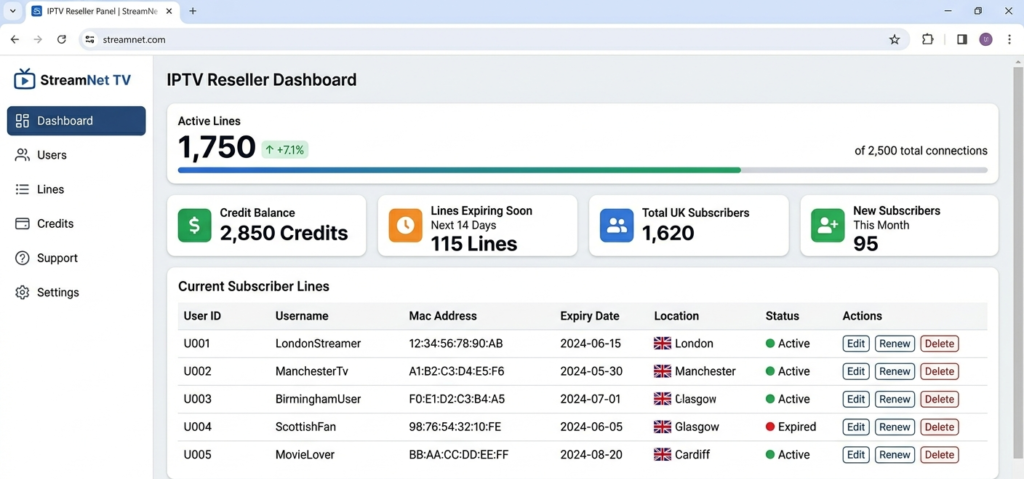
A reseller panel is the control room that sits between you and your subscribers. Think of it as the back office where everything happens. It’s where you create lines, set expiry dates, decide how many connections each client gets, and keep tabs on your whole customer base from one screen.
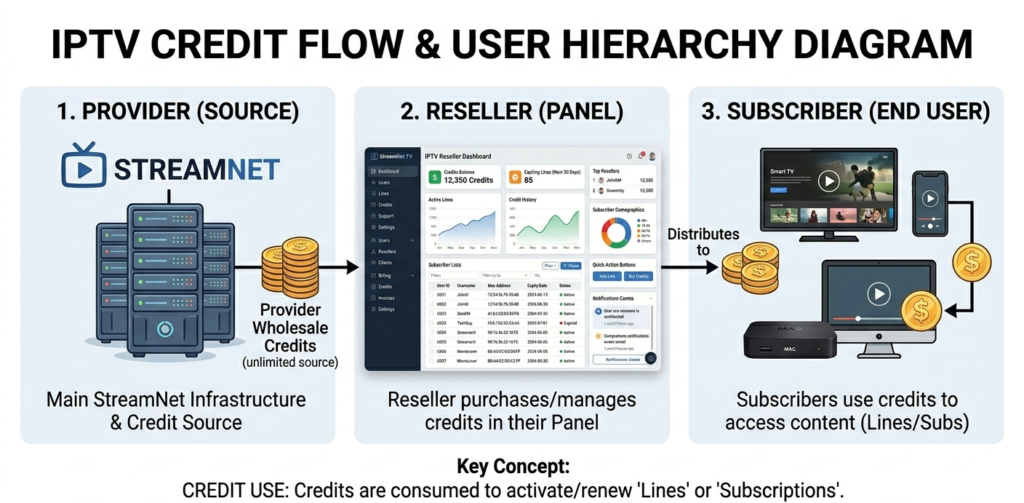
You don’t host the streams yourself. You don’t run the servers. You purchase credits from a wholesale IPTV provider, and those credits power the lines you create through the panel. The provider handles the infrastructure. You handle the clients.
That split is exactly why this appeals to people starting out. Your overheads are tiny, you can be up and running quickly, and the gap between what a credit costs you wholesale and what a subscriber pays you each month is where your profit sits.
Pro Tip: The panel is only as good as the provider running it. A beautifully designed dashboard means nothing if the streams behind it are unstable. Always test streams on multiple devices before committing to any panel.
Walking Through the Panel, Step by Step
Once you’ve got access to a reseller panel, here’s how the workflow actually runs:
Step 1 — Log in and check your credit balance. Your credit balance is your inventory. Each credit typically represents one month of one active subscription line. Know your balance before you start creating lines.
Step 2 — Create a new line. You’ll enter a username, set a password, choose the number of connections allowed (usually 1 or 2), and set the expiry date. One credit is deducted per month of subscription you activate.
Step 3 — Choose the output format. Depending on what device your subscriber is using, you’ll either provide an M3U URL, an Xtream Codes login (username, password, server URL), or a portal URL and MAC address for MAG boxes or STBEmu.
Step 4 — Send login details to your subscriber. Most UK IPTV resellers do this via WhatsApp or Telegram. Some more advanced setups automate this through a basic order flow connected to the panel API.
Step 5 — Monitor and renew. Your panel will show you which lines are active, which are expiring soon, and which haven’t been used. Proactive renewal reminders reduce churn dramatically.
Honestly, it stops feeling complicated after the first handful of lines. The only real learning curve is remembering which output format suits which device, and that just clicks into place once you’ve set up a few clients on different boxes.
Adding Your Own DNS (The Thing Everyone Googles)
This is one of the most searched questions new resellers have, and the confusion makes total sense. When someone asks about “adding a reseller DNS,” what they actually want is a custom domain or white-label URL, so that when subscribers punch in their connection details, they see your branded address instead of the provider’s raw server IP staring back at them.
Here’s how it typically works:
Your provider will give you access to a DNS or subdomain configuration section within the panel. You point a domain or subdomain you own (for example, streams.yourbrand.co.uk) to the provider’s server IP using a CNAME or A record through your domain registrar. Once the DNS propagates — usually within a few hours — your subscribers connect through your branded URL rather than the provider’s infrastructure being visible to them.
Why does this matter? Two reasons.
First, it just looks legit. A customer who sees your own URL trusts the service more than one staring at a random string of numbers. Second, and this is the bit people overlook, if you ever change providers you can simply repoint that DNS to the new server, and not a single subscriber has to touch their settings or even know it happened.
Pro Tip: Always use a domain you own for your reseller DNS setup. Never use a subdomain provided by the panel itself — if the provider goes offline or you fall out with them, you lose access to that URL and there’s nothing you can do about it.
Credits and the Wholesale Side, Explained Simply
The credit model is the foundation of the IPTV reseller panel business. You buy credits wholesale from a provider at a fixed rate per credit, then sell subscriptions to end users at a higher price. The margin is your profit.
Most UK IPTV wholesale providers price credits somewhere between £1.20 and £2.50 per credit depending on volume, quality tier, and whether the panel includes premium features like anti-freeze or multi-CDN routing.
On the retail side, UK subscribers usually pay somewhere between £6 and £12 a month depending on the package. The resellers who race to the bottom at £3 or £4 tend to pull in the fussiest customers with the least patience for a single glitch, and that pairing rarely ends well for anyone.
Where to Buy a Panel, and Who to Steer Clear Of
The most common question new resellers ask, and also the one with the most dangerous wrong answers floating around online.
Where to look:
Established IPTV wholesale communities, verified Telegram reseller groups, and platforms that have been operating for at least 12 months with verifiable reviews. britishseller.co.uk is one option that’s come up consistently among UK-based resellers looking for a clean panel setup without the usual onboarding chaos — credits are transparent, the panel structure is straightforward, and you’re not left fumbling through a 3am Telegram chat to get a basic question answered.
What to steer clear of:
Anyone demanding a big credit purchase before they’ll even let you test. Any panel that doesn’t support the Xtream Codes API, since that’s the industry standard and its absence usually means corners are being cut elsewhere too. And anyone who can’t tell you where their servers actually sit, or who waves around “unlimited connections” without a word on how their infrastructure copes with the load.
The IPTV wholesale space has its share of people running scams — taking credit payments and disappearing, or selling oversold panels where the streams degrade the moment subscriber numbers climb above a few hundred. Do not skip the trial stage regardless of how professional someone looks on a website.
Pro Tip: Ask any prospective provider what their peak concurrent connection capacity is, and what happens technically when that limit is approached. A confident, specific answer is a good sign. Vague reassurances are not.
Profit Calculations: What the Numbers Actually Look Like
Let’s run an honest scenario for a UK reseller operating a mid-sized panel:
Monthly Net Profit=(Active Lines×Retail Price)−(Credits Used×Wholesale Cost)−Fixed Overheads\text{Monthly Net Profit} = (\text{Active Lines} \times \text{Retail Price}) – (\text{Credits Used} \times \text{Wholesale Cost}) – \text{Fixed Overheads}
Realistic figures:
Active lines: 120 Retail price per line: £9/month Wholesale credit cost: £1.80/credit Fixed overheads (panel access, payment tools, domain): £40/month
Gross revenue: £1,080 Credit cost: £216 Overheads: £40 Net monthly profit: £824
That’s a genuine, achievable number for a reseller who’s been operating for six to twelve months and has built a stable subscriber base. In the first few months, expect lower retention — somewhere around 60–70% of lines staying active month-to-month — which brings that figure down to around £400–£500 net. Still meaningful for what is essentially a one-person operation.
The Mistakes That Quietly Sink New Resellers
In my experience, these are the patterns that consistently end reseller businesses before they get any momentum:
Creating lines before testing the streams. It sounds obvious, but the excitement of a new panel setup leads people to start selling before they’ve verified the streams work on the actual devices their subscribers use. MAG boxes, Firestick, Smart TV apps, and STBEmu all behave differently. Test all of them.
Ignoring the expiry dashboard. A line quietly lapsing because you forgot to nudge the customer for a renewal is the single biggest cause of churn you could’ve avoided. Build a tiny routine around it: glance at what’s expiring every Sunday, fire off reminders on Thursday. That’s it.
Choosing credit packages based purely on price. The cheapest credits in the market come from the most overloaded or least reliable servers. In the UK market specifically, where Premier League viewing drives massive concurrent load on matchdays, a cheap server will buckle exactly when it matters most.
No clear refund policy. Without one, every subscriber who has a bad stream experience will escalate directly to a chargeback. With one, you have a framework for resolving issues fairly — and payment processors look at chargeback rates. Keep yours below 1%.
Going From Solo Reseller to Supplier
The natural next step for a reseller who’s found their feet is to become a supplier in your own right, or at least to run a sub-reseller setup where other resellers buy their credits from you.
Most quality panels support this natively. You purchase credits at one rate, set a markup, and sell smaller credit packages to sub-resellers beneath you. They handle their own support and client relationships. You earn on volume without managing individual subscribers.
To get here for real, you want around 200 to 300 active lines that are actually sticking around, a provider relationship that’s already survived a few high-pressure matchday nights, and a panel that handles the sub-reseller hierarchy without fuss. Jumping into wholesale before you’ve proven the basics is one of the pricier mistakes you can make in this game.
✅ IPTV Reseller Success Checklist
1. Test every output format before you go live. M3U, Xtream Codes, and portal URLs all behave differently across devices. Know what your subscribers are using and confirm it works before you take their money.
2. Set up your reseller DNS on a domain you own. Never rely on a provider-supplied subdomain. Your branded URL is your business continuity plan.
3. Know your credit economics before you scale. Calculate your break-even point, your realistic retention rate, and your net margin at different subscriber volumes. Operate the numbers before you grow the numbers.
4. Build an expiry management routine. Check your panel weekly. Proactive renewal reminders are the single highest-return activity for reducing churn in this business.
5. Vet your provider through peak load, not just idle performance. Any server looks fine at 2am on a Tuesday. What matters is how it performs at 3pm on a Saturday when half your subscriber base is trying to watch football simultaneously.
The IPTV reseller panel business rewards operators who take the time to understand the system properly. Get your DNS setup right, manage your credits intelligently, and choose a provider whose infrastructure holds up when it’s under real pressure.
Everything else follows from those fundamentals.