Reseller IPTV Panel: How to Use It, Add DNS, and Choose the Right One
The message came in at half past nine on a Friday evening. One of my earliest subscribers, a lad I’d known for years, wanted to know why his streams had stopped working. I’d been running my reseller operation for about three weeks at that point, and I had absolutely no idea what to tell him because I barely understood my own panel.
I’d bought credits. I’d created a line. I’d sent him the details. But when something broke, I had no framework for diagnosing it. I didn’t know what the DNS settings did, I didn’t know how to check if a line was actually active, and I couldn’t tell the difference between a subscriber-side problem and an infrastructure issue.
That Friday evening cost me a subscriber, an awkward conversation, and about two hours of blind panic. But it taught me something more valuable, that the reseller IPTV panel is the engine of this business, and not understanding it properly is like driving without knowing where the accelerator is.
If you’re trying to figure out how to use a reseller IPTV panel, how to add DNS, or where to buy one that’s actually worth building a business on, this is the guide I wish I’d had before that Friday.
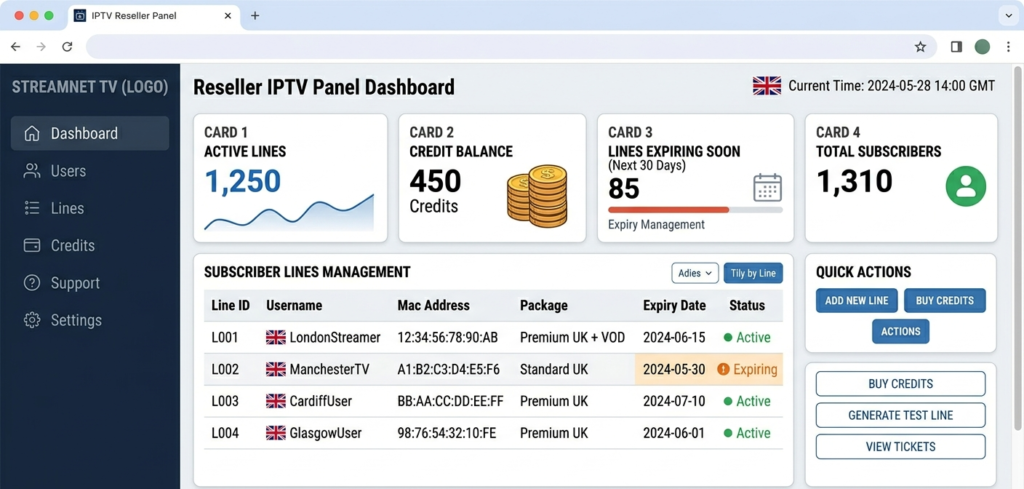
Reseller IPTV panel dashboard showing active subscriber lines, credit balance, and expiry management tools for UK operators
What Is a Reseller IPTV Panel and How Does It Work?
A reseller IPTV panel is the management interface through which you control your entire subscription business. It sits between you and your subscribers, you use it to create lines, manage access, set expiry dates, and monitor your credit balance. Your subscribers never see it. They only see the login credentials or connection details you generate through it.
The panel itself doesn’t host any streams. That infrastructure lives on your provider’s servers. What the panel does is give you a controlled interface to create and manage access to those streams via a credit system. You purchase credits from your provider, and each credit typically represents one month of one active subscription line. Spend a credit, activate a line, generate credentials, send to subscriber. That’s the core loop.
The panel is your operational backbone. A poor one will limit everything, your ability to scale, your ability to support subscribers, your ability to customise your brand, and ultimately your margins. A good one will do the opposite.
Pro Tip: When evaluating any reseller IPTV panel for the first time, the first thing to check is not the price of credits, it’s whether the panel generates valid Xtream Codes credentials, clean M3U output, and working portal URLs for MAG boxes simultaneously. If any of those three output types are broken or unreliable, a significant portion of your potential UK subscriber base won’t be able to use your service.
How to Use a Reseller IPTV Panel: A Practical Walkthrough
Once you have access to your panel, the day-to-day usage follows a consistent pattern. Here’s how it actually works in practice.
Start by checking your credit balance. Before you do anything else, know your credit position. Your balance is displayed on the main dashboard. Each line you activate will deduct credits based on the subscription duration you set. A 30-day line costs one credit. A 90-day line costs three. Running your balance too low leaves you unable to service renewal requests, and that leads to expired lines, unhappy subscribers, and churn.
Next, create a new line. Navigate to the line creation section. You’ll set a username, a password, the number of simultaneous connections allowed (typically one or two for standard UK subscribers), and the expiry date. Some panels let you apply a bouquet or package selection at this stage, which determines which content groupings the subscriber can access.
Then choose the output format. This is where most new resellers get confused. Depending on what device your subscriber is using, they’ll need one of three connection formats.
M3U URL works for apps like IPTV Smarters, TiviMate, or any player that accepts a playlist link. The panel generates a unique M3U URL tied to the line credentials.
Xtream Codes uses a username, password, and server URL that apps use to authenticate directly against the panel API. This is the most stable format for most modern IPTV apps.
Portal URL and MAC address work for MAG boxes and STBEmu. The subscriber registers their device MAC address through the panel, and then connects using a portal URL you provide.
Know which format your subscriber needs before you create the line. It saves a support conversation later.
After that, deliver the credentials. Most UK IPTV resellers deliver credentials via WhatsApp or Telegram. Include the connection format details, a brief setup note, and the expiry date. Some more advanced operators automate this step through an order management integration, but manual delivery works fine at small scale.
Finally, monitor and renew. Your panel will show active lines, upcoming expiries, and connection activity. Check it regularly, especially the expiry view. Subscribers who lapse because nobody reminded them to renew often don’t come back, not because they were dissatisfied, but because they found an alternative in the gap.
How to Add a Reseller DNS to the IPTV Panel
This is one of the most searched questions among people setting up a reseller IPTV panel for the first time, and it’s genuinely important to get right.
Adding a reseller DNS to your IPTV panel means configuring a custom domain or subdomain, one that you own, to serve as the connection address for your subscribers. Instead of connecting through a raw IP address or a generic URL tied to your provider’s infrastructure, your subscribers connect through something like streams.yourbrandname.co.uk.
Here is how the process works in practice. Your provider will give you access to a DNS or white-label configuration section inside the panel. In that section, you’ll find the server IP address or a CNAME target that your domain needs to point to. You then log in to your domain registrar, wherever you purchased your domain, and create either an A record pointing to the server IP, or a CNAME record pointing to the target your provider specifies.
DNS changes propagate within a few hours in most cases, though it can take up to 24 hours depending on your registrar’s TTL settings. Once propagation is complete, your subscribers’ apps will connect through your branded domain rather than the provider’s raw infrastructure being visible to them.
Why this matters for a serious reseller operation: first, it’s professional and builds trust with subscribers. Second, and more importantly, it’s your business continuity mechanism. If you ever need to switch providers, you update the DNS record to point to the new server. Every subscriber automatically routes through the new infrastructure without needing updated credentials. Without your own DNS, a provider switch means manually re-issuing credentials to every active subscriber. At 100+ lines, that’s a significant operational nightmare.
Pro Tip: Register your streaming domain separately from your main business website. Use a clean, neutral subdomain, something like streams.yourdomain.co.uk or tv.yourdomain.co.uk. Avoid anything that explicitly references your provider’s name or any specific service terminology. You want a domain that works regardless of which provider sits behind it.
Understanding the Credit System Inside Your Panel
The credit system is straightforward once you internalise it, but it has nuances that matter to your margins.
Credits are consumed when you activate lines, not when subscribers watch streams. If a subscriber cancels after two weeks of a 30-day subscription, you don’t get that credit back. This means your effective cost per active subscriber is slightly higher than your nominal cost per credit, because some portion of your credits will always go to churned, refunded, or trial lines that don’t convert to full paying subscriptions.
Most experienced resellers factor in a credit wastage rate of around 10 to 15% when calculating their real cost structure. This isn’t pessimism, it’s accurate modelling.
Within your panel you’ll also typically be able to set credit costs for any sub-resellers beneath you. If you’ve reached the stage where you’re supplying credits to other resellers, the panel manages the credit hierarchy, you purchase at your wholesale rate, set a markup, and your sub-resellers spend from their allocated balance.
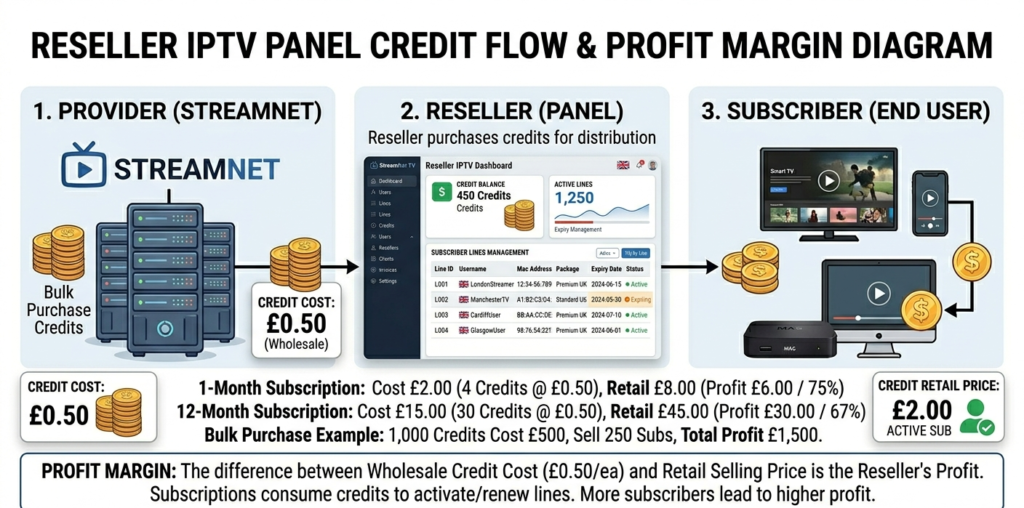
Reseller IPTV panel credit system diagram showing wholesale credit costs, retail pricing, and profit margin for UK operators
Key Panel Features That Separate Good From Mediocre
Not all reseller IPTV panels are built to the same standard. Here’s what the better ones include that the mediocre ones don’t.
Sub-reseller account management matters enormously. A properly built panel lets you create reseller accounts beneath yours, each with their own credit balance and subscriber base, without them having access to your account or your provider relationship. This is essential if you want to scale through a network of sub-resellers.
API access via Xtream Codes protocol becomes important as you grow. At a certain subscriber volume, manual line creation becomes a bottleneck. Panels that expose a working API allow you to integrate automated order fulfilment, a subscriber purchases through your website, a line is created automatically, and credentials are delivered without you lifting a finger.
A clean expiry management dashboard is worth prioritising too. The best panels show you upcoming expiries sorted by date, with one-click renewal options. This makes proactive subscriber management fast enough to actually do regularly rather than something you keep meaning to get around to.
Connection activity monitoring helps you spot problems early. Being able to see which lines are actively connecting, which haven’t been used recently, and which are generating an unusual number of reconnection events helps you spot both disengaged subscribers and potential credential sharing.
And anti-freeze routing integration matters for diagnostics. The panel should reflect whether a line is being served through a failover node, meaning you can tell, when a subscriber reports a problem, whether the issue is at the infrastructure level or at their end.
Where to Buy a Reseller IPTV Panel in the UK
The question of where to buy a reseller IPTV panel is really a question of which provider to attach your business to, because the panel comes with the provider relationship, not separately.
Here’s how to approach the search. Start with verified UK IPTV reseller communities. Established Telegram groups and Discord communities where resellers have been operating for over a year tend to have better signal on which providers are currently reliable. Not perfect signal, but better than a cold Google search.
Prioritise providers who have been operating continuously for at least twelve months. New providers in this space are a higher risk. The operational and financial pressures that cause providers to disappear tend to manifest within the first year. A provider who’s been consistently active for longer than that has at least demonstrated some stability.
Test before any significant credit purchase. The process is always the same, request a trial, test across all relevant device types and output formats, test under load during a live broadcast, contact support with a technical question and evaluate the response. Any provider worth buying from will accommodate this process.
britishseller.co.uk is a starting point worth evaluating if you’re in the UK market and looking for a panel that handles the foundational requirements cleanly. The credit structure is transparent, the panel supports the key features a growing reseller needs, and the onboarding process doesn’t require you to navigate a series of Telegram chats to get a basic question answered. It won’t be the right fit for everyone, but it deserves a place on any serious shortlist.
Profit Calculations: Running the Numbers on Your Panel Setup
Monthly net profit works out to active lines multiplied by retail price, minus credits issued multiplied by wholesale rate and adjusted by the wastage rate, minus overheads.
Applying realistic UK figures including a 12% credit wastage rate: active lines: 95. Retail price: £9/month. Credits issued: 108 (accounting for 12% wastage on 95 active lines). Wholesale rate: £1.80/credit. Monthly overheads: £40.
Gross revenue: £855. Adjusted credit cost: £194.40. Overheads: £40. Net monthly profit: £620.60.
Modelling wastage into your calculations from the start prevents the surprise gap between theoretical margins and actual bank balance that catches many new resellers off guard in their first few months.
Mistakes New Resellers Make With Their Panel
From what I’ve seen, the errors that cost people the most time and money are surprisingly consistent.
Not setting up DNS on a personal domain before going live. Building a subscriber base on a provider-supplied URL and then needing to migrate is an operational nightmare that is entirely avoidable. Do the DNS setup first, before you activate a single paying line.
Ignoring connection activity monitoring. If a line that should be serving one subscriber is showing three or four simultaneous connection attempts from different IP addresses, your credentials have been shared or leaked. Catching this early prevents the server load and churn that follow.
Manually renewing lines reactively rather than proactively. Subscribers who let their line expire are hard to re-engage. Sending a renewal reminder four days before expiry, directly from your panel’s expiry management view, takes five minutes per week and meaningfully reduces churn.
Buying credits faster than you’re building the subscriber base to use them. Credits that sit unused for weeks represent cash tied up in inventory that isn’t generating return. Match your credit purchases to your subscriber growth rate, not to an optimistic projection.
Not keeping subscriber records outside the panel. If your provider goes dark and your panel becomes inaccessible, the only thing that lets you recover your business is an independent record of your subscribers and their contact details. Keep it updated. Always.
Pro Tip: Set a weekly fifteen-minute panel review routine. Check upcoming expiries, review connection activity for anomalies, verify your credit balance against expected consumption, and send any pending renewal reminders. This single habit, done consistently, is worth more to your retention rate than any marketing effort.
IPTV Reseller Success Checklist
Set up your reseller DNS on a domain you own before activating any paying lines. This is your business continuity infrastructure. Do it first, not later.
Test all three output formats, M3U, Xtream Codes, and portal URL, before going live. Know which works on which device so you can support subscribers without guesswork.
Model credit wastage into your profit calculations from day one. A 10 to 15% wastage rate is realistic. Build it into your pricing and your credit purchase decisions.
Build a subscriber database outside your panel and update it weekly. Your independent records are your recovery plan if the panel ever becomes inaccessible.
Establish a weekly panel review routine. Expiry management, connection monitoring, and credit tracking done consistently every week will have a greater impact on your profitability than any other single habit in this business.
The reseller IPTV panel is where your business actually runs. Understanding it properly, the credit system, the DNS setup, the output formats, the monitoring tools, is what separates a reseller who builds something sustainable from one who stays permanently reactive.
Get the foundation right and everything else becomes significantly more manageable.