IPTV Content Management System for UK Resellers: Why It Decides Whether Subscribers Renew
An IPTV content management system is the layer of your reseller panel that organises, labels, and presents content to subscribers, covering EPG scheduling, the VOD catalogue, and channel categories, sitting separately from the raw stream infrastructure itself. Your streams can be flawless and subscribers will still churn if this layer is broken, because a confusing or unreliable content experience makes the whole service feel unprofessional even when nothing is technically wrong with playback.
I watched a reseller lose 28 subscribers in a single fortnight, and the cause wasn’t stream quality. It wasn’t pricing. It wasn’t even a provider outage. It was his panel’s content management system, or more accurately, the near-total absence of one.
His EPG data was perpetually 24 hours behind. VOD titles were listed in the catalogue but returned playback errors when subscribers tried to watch them. Categories were disorganised to the point where subscribers couldn’t find what they were looking for without scrolling through hundreds of unlabelled entries. The streams themselves were fine. But the experience around them was so frustrating that subscribers simply stopped renewing.
“The streams work,” he told me, genuinely confused about why he was losing people. “I keep telling them the streams work.”
The streams working is the floor, not the ceiling. What sits on top of the streams, how content is organised, labelled, updated, and presented, is what your IPTV content management system handles. And for a serious UK IPTV reseller in 2026, understanding this layer of the infrastructure is no longer optional.
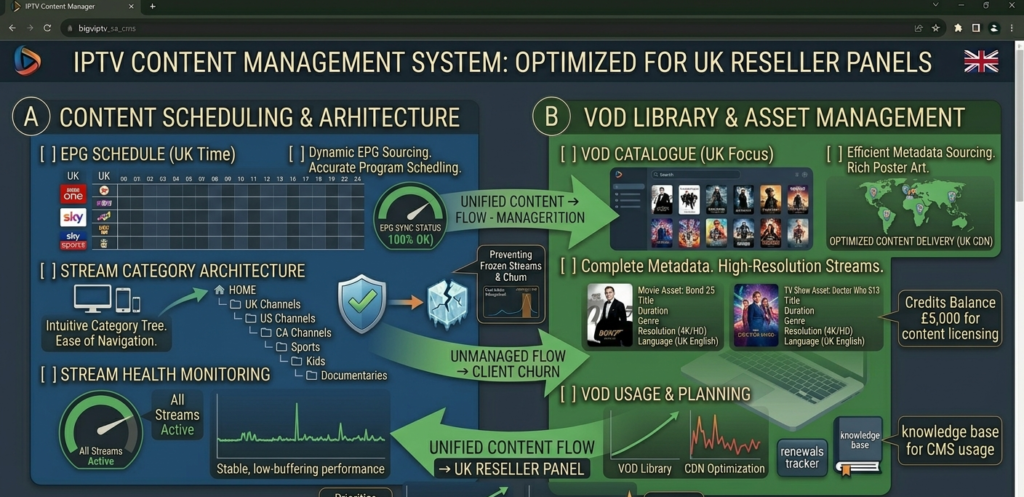
IPTV content management system dashboard showing EPG scheduling, VOD library organisation, and stream category management for UK reseller panels
Breaking Down What the CMS Layer Actually Covers
In the broader tech world, a content management system is the backend infrastructure that organises, stores, and delivers content to end users. In the IPTV context, it’s the layer of your panel that sits between the raw stream data and what your subscribers actually see and interact with.
A good IPTV CMS handles several distinct functions simultaneously. It organises live channels into logical, navigable categories. It manages electronic programme guide data, the scheduling information that tells subscribers what’s on now, what’s coming next, and what they might want to set a reminder for. It maintains the video-on-demand library: titles, metadata, thumbnails, playback links, and catalogue organisation. And increasingly in 2026, it handles catch-up TV functionality, the ability for subscribers to access content aired in the previous 24 to 72 hours.
What it doesn’t do, and this is a distinction that matters, is source, encode, or host the actual stream content. The CMS is the organisational and presentational layer. The streams themselves come from upstream infrastructure managed by your panel provider. These two systems interact constantly, but they’re architecturally separate, which means a panel can have excellent streams and a terrible CMS, or mediocre streams and an excellent CMS. Neither combination is ideal, but they fail in different ways.
The reseller I mentioned at the start had decent streams and a dysfunctional CMS. His subscribers couldn’t navigate the content effectively, couldn’t trust the EPG data, and couldn’t rely on the VOD catalogue. So they left, not because the streams were bad, but because the experience around the streams was poor enough to make the whole service feel unprofessional.
Pro Tip: When trialling a new panel, spend at least 30 minutes navigating the content interface as if you were a subscriber who doesn’t know the system. Try to find a specific live event using the EPG. Browse the VOD catalogue and attempt to play three or four titles. Check that category labelling makes intuitive sense. If you find it confusing or unreliable as someone who understands IPTV, your subscribers, many of whom don’t, will find it worse.
Why CMS Quality Directly Affects Your Subscriber Retention
This is the business argument that most resellers don’t make explicit until they’ve experienced subscriber loss from CMS failure firsthand.
Subscriber retention in an IPTV reseller business depends on two things: stream reliability and user experience. Most resellers focus almost exclusively on stream reliability, understandably, because buffering and outages are visible, immediate, and generate loud complaints. CMS problems are quieter. Subscribers don’t usually message you saying “your EPG is 18 hours behind and your VOD thumbnails are broken.” They just don’t renew. And when you ask why, they say something vague like “I found something else” or “just decided to try a different service.”
In my experience, CMS-related churn is significantly underestimated in this industry because it’s harder to attribute. A stream outage on Saturday afternoon generates immediate refund requests you can trace directly. An EPG that’s consistently unreliable generates a slow, quiet drift toward non-renewal that only shows up in your monthly churn data, by which point the pattern has already been running for weeks.
The practical implication: selecting a panel based purely on stream quality testing, without evaluating CMS quality, leaves a significant churn driver unaddressed.
The Core Components Every Reseller Should Understand
Breaking down an IPTV content management system into its constituent parts makes evaluation much more straightforward.
Electronic Programme Guide (EPG) engine: the system that pulls scheduling data from programme guides, maps it to the correct channels in your lineup, and keeps it accurate and timely. A well-functioning EPG shows accurate now-and-next information, updates correctly at programme boundaries, and displays multi-day schedules reliably.
VOD catalogue management: the database layer that stores metadata for video-on-demand titles: names, descriptions, genre classifications, thumbnails, content ratings, and playback stream links. Good VOD management means titles are findable, descriptions are accurate, thumbnails display correctly, and playback links are live and functional.
Category and playlist architecture: how channels and content are grouped and labelled in the subscriber-facing interface. Logical categorisation by content type, region, and genre dramatically reduces subscriber friction in finding what they want.
Catch-up TV management: increasingly important in the UK market, catch-up functionality requires the CMS to maintain time-shifted stream records for a rolling window, typically 24 to 72 hours. This system needs to be reliable enough that subscribers can trust it as a genuine alternative to traditional catch-up services.
Search and discovery functionality: the ability for subscribers to search for specific content and receive accurate, relevant results. In a large content library, search is the difference between a usable service and a frustrating one.
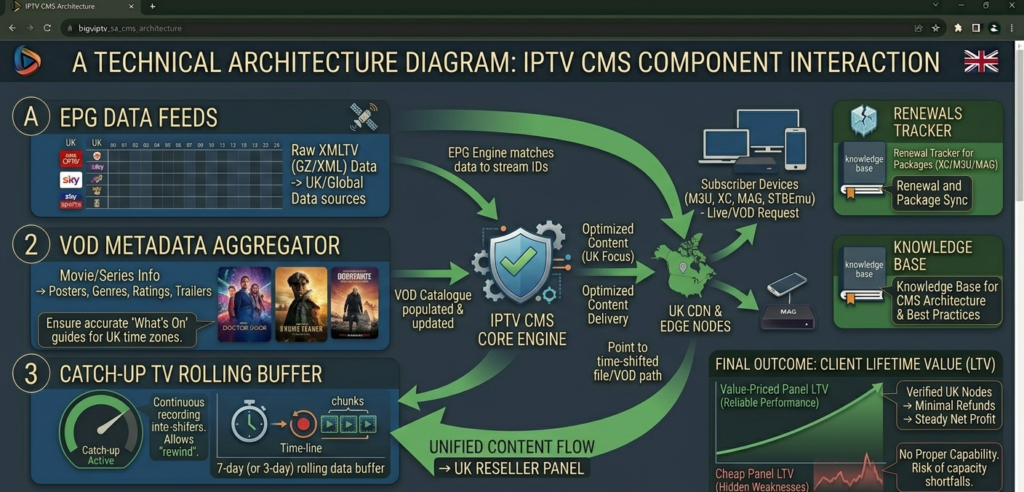
Diagram showing IPTV CMS component architecture including EPG engine, VOD catalogue, catch-up TV management, and category organisation for UK reseller panels
Why EPG Management Gets Ignored Until It Costs You Subscribers
The electronic programme guide is the single most underrated feature in an IPTV panel evaluation. Most resellers check whether EPG exists. Almost none verify how well it actually functions under real operating conditions.
Here’s what good EPG management looks like in practice: programme information updates automatically as schedules change. The EPG data is sourced from reliable, regularly refreshed providers, not scraped once weekly from a static source. Channel mapping is accurate, meaning the schedule displayed for a channel actually corresponds to what’s playing on that channel. Multi-day forward scheduling is populated reliably, not just the next few hours.
Here’s what poor EPG management looks like: schedule data is perpetually behind by 12 to 24 hours, so the EPG always shows what was on yesterday rather than what’s on now. Channel mismatches occur regularly, the EPG for one channel displays the schedule for a different one. Large blocks of “No Information” appear across the guide because the CMS hasn’t successfully mapped schedule data to those channels. Forward scheduling beyond tonight is blank or unreliable.
For UK subscribers specifically, EPG accuracy during live sporting events matters enormously. A subscriber using the EPG to find and navigate to a live fixture, and finding either wrong information or blank data, loses confidence in the service immediately. That loss of confidence compounds over time.
Pro Tip: Test EPG accuracy by checking three things specifically: whether the “now playing” information matches what’s actually streaming, whether the next programme listing is correct, and whether forward scheduling for the next 24 hours is populated. Do this test at two different times of day. If EPG accuracy is inconsistent across those checks, it will be inconsistent for your subscribers, and they’ll notice.
VOD Library Management and Why It Matters More Than You Think
The video-on-demand library has become a significant subscriber retention factor that didn’t exist as meaningfully even three years ago. UK subscribers in 2026 expect a functional, navigable VOD catalogue as a standard feature, not a bonus.
What this means practically for your panel’s CMS:
- Catalogue accuracy: titles listed in the VOD library should be playable. Dead links, playback errors, and “content unavailable” messages on titles that appear active in the catalogue erode subscriber trust fast.
- Metadata quality: descriptions, genre tags, and content classifications should be accurate and populated. A VOD catalogue of unlabelled titles with no descriptions is barely more useful than a list of stream URLs.
- Thumbnail integrity: broken or missing thumbnails across the VOD library make the interface look broken, even when the underlying streams work perfectly. First impressions in a visual interface matter.
- Regular updates: the catalogue should be actively maintained, with new titles added regularly and dead links removed or replaced. A static VOD library that hasn’t been updated in months signals a provider who isn’t actively managing their CMS.
- Search functionality: subscribers should be able to find specific VOD titles by name without scrolling through hundreds of catalogue entries. If search returns inaccurate results or fails to surface titles that exist in the library, it’s functionally broken.
Stream Organisation and Category Architecture
This is the CMS component that shapes every subscriber’s daily experience of your service, and it’s almost never discussed in reseller communities because it’s not technically glamorous. But get it wrong and every subscriber interaction with the content interface becomes a minor frustration that compounds over time.
Good category architecture means channels and content are grouped in ways that match how subscribers actually think about what they want to watch. Broad categories by content type, sport, entertainment, news, kids, with subcategories where volume justifies it. Within sport, logical subdivision by format or competition. Within entertainment, organisation by genre or region of origin.
Poor category architecture, which is unfortunately the default state of many panels, means content is organised in whatever order it was added to the system, with category labels that reflect internal naming conventions rather than subscriber intuition. Finding a specific channel becomes a search exercise rather than a navigation exercise.
For UK resellers, the sport category architecture deserves particular attention. How live sporting content is organised and labelled is the thing your most engaged subscribers interact with most frequently. If navigating to live sport on a Saturday afternoon requires more than two or three taps or clicks, the architecture needs work.
A useful way to think about the overall experience: subscriber experience score equals stream quality plus EPG accuracy plus CMS organisation, divided by three. All three components matter equally in the long run. A score of 10/10 on streams, 4/10 on EPG, and 3/10 on CMS organisation produces an average subscriber experience score of 5.7, below the threshold where most subscribers consider the service worth keeping long-term.
UK-Specific CMS Requirements
The UK market has content consumption patterns that place specific demands on CMS quality that a generic international panel may not address adequately.
Premier League and live sport navigation: during the 3pm Saturday window, subscribers are actively navigating to specific fixtures. The speed and accuracy of content discovery in that specific high-demand window matters disproportionately relative to other use cases.
Catch-up TV expectations: UK subscribers are accustomed to robust catch-up functionality from terrestrial broadcast services. An IPTV catch-up system that’s unreliable, slow, or limited to a narrow time window will be unfavourably compared to free-to-air alternatives.
British English metadata: programme descriptions, genre labels, and category names should use British English conventions. Subscribers notice Americanised spelling and terminology in a service they’re paying for, it signals the CMS isn’t specifically maintained for the UK market.
Time zone accuracy: EPG scheduling data must reflect UK time zones correctly, including BST adjustments. An EPG that displays scheduling in UTC during British Summer Time is wrong by an hour for several months of the year, a surprisingly common failure that generates regular subscriber complaints.
Pro Tip: Check your panel’s EPG time accuracy specifically during BST, the period from late March to late October when UK clocks are an hour ahead of UTC. Many panels source EPG data in UTC and fail to apply the BST offset correctly, leaving subscribers with schedules that are consistently an hour off during half the year. Test this specifically, because providers rarely flag it proactively.
How to Evaluate CMS Quality Before Committing to a Panel
A proper CMS evaluation takes about two hours and should happen before any significant credit purchase. Here’s the process I’d use:
EPG accuracy test: check now-and-next information against actual stream content at three different times across a 24-hour period. Verify multi-day forward scheduling is populated. Look for channel mapping errors.
VOD library audit: attempt to play ten randomly selected VOD titles. Note how many play successfully, how many return errors, and whether metadata and thumbnails are populated correctly.
Category navigation test: navigate to live sport during an active event window without using search. Count the steps required. Try to find a specific content type in three different category areas.
Search functionality test: search for five specific titles or channels you know should be in the library. Evaluate the accuracy and relevance of results.
Catch-up TV test: attempt to access catch-up content from 24 hours prior. Verify the time-shifted stream plays correctly and that the time window is clearly indicated.
Document everything. A panel that scores poorly across these tests will generate subscriber friction daily, at a scale that directly affects your renewal rate and monthly profit.
Putting a Number on What Poor CMS Quality Costs You
Let me put a number on what poor CMS quality costs a typical reseller operation.
Assume 80 subscribers, £8 monthly retail price. A panel with poor CMS quality drives 15% monthly churn primarily from experience frustration rather than stream failure. A panel with strong CMS quality maintains 5% monthly churn.
The annual revenue difference works out to the churn rate difference multiplied by subscribers, multiplied by retail price, multiplied by 12. Plugging in the numbers: 0.10 × 80 × £8 × 12 comes to £768 per year.
That’s £768 annually that the better CMS panel delivers purely through improved retention, before accounting for the referral value of satisfied subscribers who recommend the service, or the acquisition cost of replacing churned subscribers.
At 150 subscribers, the same calculation produces over £1,400 annual difference. The CMS quality gap is not a minor feature distinction. It’s a meaningful revenue driver that compounds as your subscriber base grows.
Honest Recommendation
The IPTV reseller market in 2026 has matured to the point where stream quality alone no longer differentiates a successful operation from a struggling one. Every credible panel has passable streams. The differentiation happens in the layers above the streams, EPG accuracy, VOD library quality, content organisation, catch-up reliability, and that’s exactly what a well-built content management system delivers.
When I evaluate panels for resellers who are serious about building sustainable operations, CMS quality is now one of the first things I look at rather than one of the last. It’s genuinely that important to long-term subscriber retention.
For UK IPTV Panel resellers who want a panel where the CMS layer has been built with the British market specifically in mind, accurate EPG scheduling, organised content architecture, and reliable VOD management, britishseller.co.uk is worth evaluating seriously. It’s the recommendation I make when a reseller is ready to stop losing subscribers to experience friction they can’t quite identify and start building the kind of retention rate that makes the business genuinely scalable.
IPTV Content Management System: Reseller Success Checklist
- Evaluate CMS quality as rigorously as stream quality: run a structured two-hour CMS audit including EPG accuracy testing, VOD playback verification, category navigation, and search functionality before committing significant credit spend to any panel.
- Check EPG time zone accuracy specifically during BST: the March to October period when UK clocks run an hour ahead of UTC catches out a surprising number of panels that source EPG data in UTC without applying the offset correctly.
- Test VOD playback on randomly selected titles, not curated showcases: providers will always point you to their best content during a demo. The reliability of randomly selected titles tells you the actual state of library maintenance.
- Navigate to live sport during a real event window: the speed and accuracy of content discovery during an active sporting session is the highest-pressure use case for your CMS. If it’s clunky during a live event, it will generate subscriber friction every single Saturday.
- Track CMS-related complaints separately from stream complaints: EPG errors, broken VOD links, and navigation confusion generate different complaints than buffering and outages. Separating them in your support log helps you identify whether churn is driven by infrastructure or experience, and which problem to prioritise fixing first.